
Command Line Interface
Send push notifications from your terminal, scripts and CI, and manage Pocket Alert applications, devices, webhooks and API keys. Source code and releases: github.com/PocketAlert/cli.
Installation
curl -fsSL https://raw.githubusercontent.com/PocketAlert/cli/main/install.sh | shbrew install pocketalert/tap/pocketalertgo install github.com/PocketAlert/cli/cmd/pocketalert@latestThe script verifies the SHA-256 checksum and installs to /usr/local/bin (or ~/.local/bin). Set POCKETALERT_VERSION=v2.0.0 to pin a version.
Manual download
These links always point to the latest release:
| Platform | Architecture | Download |
|---|---|---|
| Linux | AMD64 | pocketalert_linux_amd64.tar.gz |
| Linux | ARM64 | pocketalert_linux_arm64.tar.gz |
| macOS | Intel | pocketalert_darwin_amd64.tar.gz |
| macOS | Apple Silicon | pocketalert_darwin_arm64.tar.gz |
| Windows | AMD64 | pocketalert_windows_amd64.zip |
tar -xzf pocketalert_*.tar.gz
sudo mv pocketalert /usr/local/bin/
# macOS, if Gatekeeper blocks a browser download:
xattr -d com.apple.quarantine /usr/local/bin/pocketalert# Unzip, then add the folder with pocketalert.exe to PATH
.\pocketalert.exe --helpAuthentication
Create an API key in Settings → API Keys, then:
pocketalert authPaste the key at the hidden prompt — it stays out of your shell history. The CLI checks the key before saving it to ~/.pocketalert/config.json. You can also pipe it: echo "$KEY" | pocketalert auth.
In CI and containers, skip auth and set an environment variable instead:
| Variable | Purpose |
|---|---|
POCKETALERT_API_KEY | API key; takes precedence over the saved one |
POCKETALERT_API_URL | API base URL (default https://api.pocketalert.app) |
POCKETALERT_CONFIG | Path of the config file |
pocketalert profile   # who am I?
pocketalert logout    # remove the saved key
Sending notifications
pocketalert send "Deploy finished" "v1.4.2 is live"Title and message can be arguments or flags (-t, -m). Pipe text in, or pass -m -, to read the message from stdin:
df -h | pocketalert send "Disk report"| Flag | Description |
|---|---|
-a, --app <tid> | Application |
-d, --device <tid> | Device, or all (default: every device) |
-l, --level <level> | silent, low, default, high, critical (or -2…2) |
--action <type:label:value> | Action button, repeat up to 3 times |
--image <path|url> | Image attachment |
--at <time> | Deliver at 2026-10-20 09:00 (account timezone), RFC 3339 or Unix seconds |
--in <delay> | Deliver after 30m, 2h, 1d, 1d12h |
-q, --quiet | Print only the message TID |
Levels
pocketalert send "Disk 95%" "/var is almost full" --level high
pocketalert send "Prod is down" "502 from api" --level critical
critical bypasses Do Not Disturb. Paid On the free plan it is delivered as high and the CLI prints a note. See Priority levels.
Action buttons Paid
pocketalert send "Deploy failed" "main@4f2c" -l critical \
  --action "view:Open logs:https://ci.example.com/run/1" \
  --action "http:Retry:https://ci.example.com/run/1/retry" \
--action "copy:Copy SHA:4f2c9e1"| Type | Value |
|---|---|
view | URL to open |
http | URL (sends POST), GET https://…, or a JSON object {"url":"…","method":"PUT","headers":{…},"body":"…"} |
copy | Text to copy |
See Action buttons.
Scheduled delivery Paid
pocketalert send "Standup" "In 10 minutes" --at "2026-10-20 09:50"
pocketalert send "Reminder" "Rotate the keys" --in 1d

pocketalert scheduled list                  # pending, soonest first
pocketalert scheduled list --status all
pocketalert scheduled cancel <tid>
Messages can be scheduled up to 30 days ahead. See Scheduled delivery.
Images Paid
pocketalert send "Grafana" "CPU spike" --image ./panel.png
pocketalert send "Grafana" "CPU spike" --image https://example.com/panel.png
Interactive mode
pocketalert uipocketalert ui opens a full-screen app. Browse and search the inbox, read messages (opening one marks it as read), and compose new ones with an application, device, level, delivery time, image and action buttons. Scheduled messages, applications, devices and webhooks — with their recent requests — are one keypress away. New messages appear automatically.
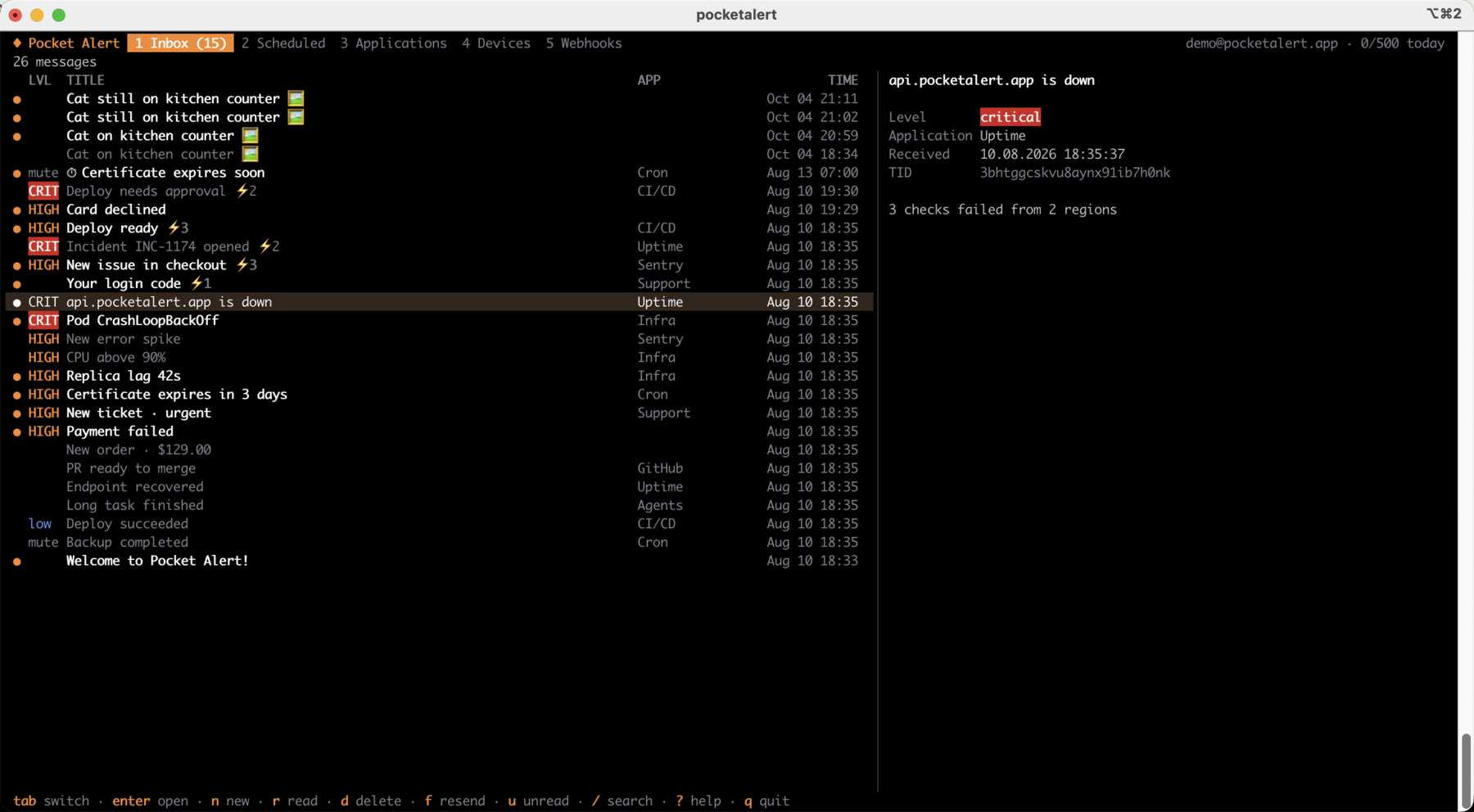
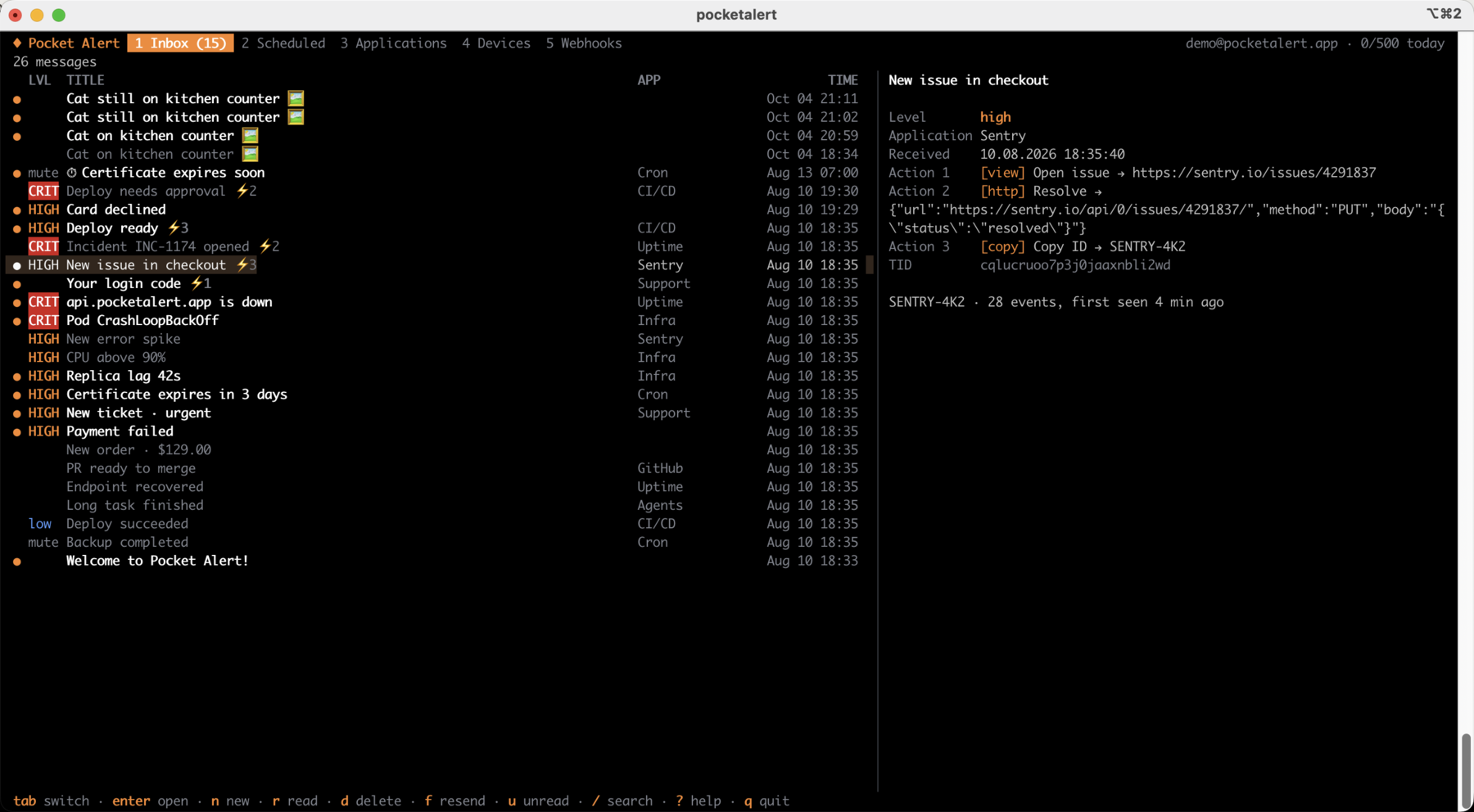
The preview pane shows the whole message, including its action buttons and where each one points:
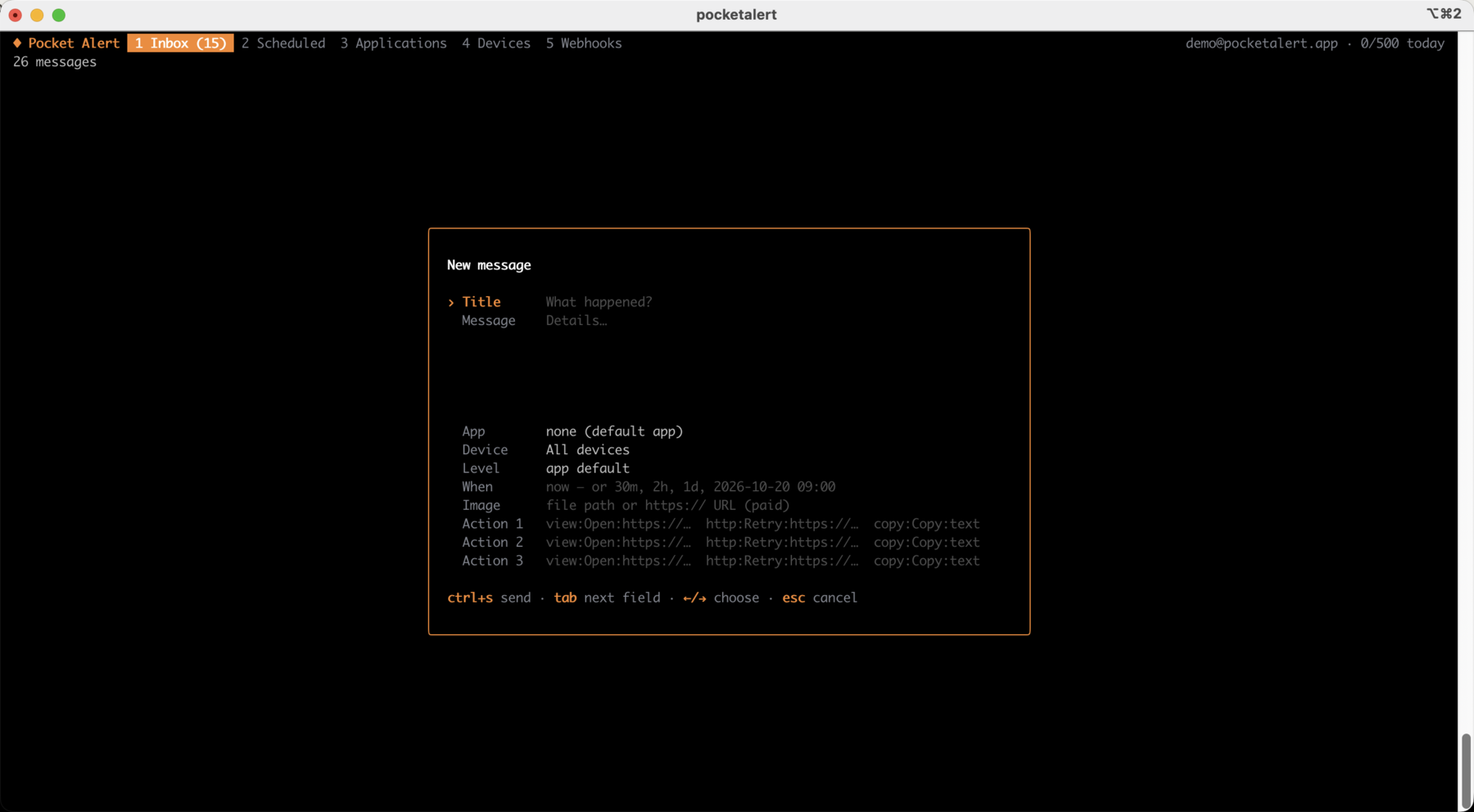
n opens the composer. Action buttons use the same type:label:value format as --action:
| Key | Action |
|---|---|
tab, 1…5 | Inbox, Scheduled, Applications, Devices, Webhooks |
enter / esc | Open / back. On an application or device: show its messages |
n | New message, ctrl+s sends |
f | Resend or duplicate the selected message |
r / a / u | Toggle read / mark all read / show only unread |
d | Delete a message, cancel a scheduled one, remove a resource (asks first) |
s | Send to the selected application or device |
e / v / t | Rename / app default level / pause or resume a webhook |
/ | Search |
y | Copy the message text, TID or webhook URL |
? | All shortcuts |
Notify when a command finishes
exec runs a command, streams its output as usual, then sends a push with the exit status, duration and the last lines of output. The command's exit code is passed through.
pocketalert exec -- make release
pocketalert exec --on failure -l critical -- ./backup.sh
pocketalert exec -t "Nightly import" --tail 20 -- python import.py| Flag | Description |
|---|---|
--on <when> | always (default), success, failure |
--tail <n> | Lines of output to include (default 10, 0 to omit) |
-t, --title <name> | Name in the title instead of the command |
Failed runs default to level high. All delivery flags of send (-a, -d, -l, --action) work here too.
Watch a log
watch turns piped lines into notifications. Lines that arrive within --batch (default 5s) are grouped into one push, up to --max-lines (default 20), so a burst of errors costs one message from your daily quota.
tail -f app.log | grep --line-buffered ERROR | pocketalert watch -t "app errors"
journalctl -fu nginx | pocketalert watch --batch 1m -l high
Messages
pocketalert messages list                 # 20 newest
pocketalert messages list -n 50 --offset 50
pocketalert messages list --sort asc --device <device-tid>
pocketalert messages get <tid>            # also marks it as read
pocketalert messages read <tid> [<tid>…]
pocketalert messages read --all
pocketalert messages delete <tid> [<tid>…]
pocketalert messages delete --all         # asks for confirmation; --yes in scripts
pocketalert messages stats                # messages per day
pocketalert usage                         # today's usage against the daily limit
Applications
pocketalert apps list
pocketalert apps get <tid>
pocketalert apps create -n "Production" -c "#EF4444" -l high
pocketalert apps update <tid> --name "Prod" --level critical
pocketalert apps delete <tid>
--level sets the default level for messages that don't specify one.
Devices
pocketalert devices list
pocketalert devices get <tid>
pocketalert devices rename <tid> "Work iPhone"
pocketalert devices delete <tid>
Webhooks
pocketalert webhooks list
pocketalert webhooks get <tid>
pocketalert webhooks history <tid> [--status error] [--page 2]
pocketalert webhooks delete <tid>pocketalert webhooks create -n "GitHub" -m "*"pocketalert webhooks create -n "Deploy" -m "Deployed %repository.name% by %sender.login%"pocketalert webhooks create -n "Alertmanager" -m "%alerts.0.annotations.summary%" -l critical \
--action "view:Open:%externalURL%"pocketalert webhooks create -n "Uptime" -m "%monitor.name% is %status%" --slug uptime-alertsThe output shows the inbound URL (https://p4a.me/wh/…) and a curl command to test it. webhooks update <tid> changes only the flags you pass; use --active=false to pause a webhook.
Forms
pocketalert forms list
pocketalert forms delete <tid>
Forms are created in the web console.
API keys
pocketalert apikeys list
pocketalert apikeys create -n "CI"
pocketalert apikeys delete <tid>
WARNING
The token is printed once on creation — store it right away.
Scripting
Every command accepts --json and prints the raw API response:
pocketalert messages list --json | jq -r '.data[].title'
TID=$(pocketalert send "Build" "started" -q)
Errors go to stderr and exit with a non-zero code. A 429 response explains the daily limit and when it resets.
Configuration
pocketalert config                                    # show settings and where the key comes from
pocketalert config set base_url https://api.example.com
pocketalert config reset base_url
~/.pocketalert/config.json (permissions 600, directory 700):
{
  "api_key": "your-api-key",
  "base_url": "https://api.pocketalert.app"
}
Upgrading from 1.x
Install 2.x with any method above; it reads the same ~/.pocketalert/config.json, so the saved key keeps working. Scripts may need three changes:
- A message is required.
pocketalert send -t "Cron OK"without-mis an error now. Add a message, pipe one in, or useexec. - Don't mix the forms. Use
send "Title" "Message"orsend -t "Title" -m "Message".send -t "Title" "Message"fails withtitle given both as argument and --title. - Use
-mfor generated text. A positional message that starts with-(a Markdown list from an AI agent, for example) is parsed as a flag;-m "$text"is always safe.
Release archives are now pocketalert_<os>_<arch>.tar.gz (.zip on Windows) instead of the old cdn.pocketalert.app/cli/*.zip files.
Shell completion
pocketalert completion zsh > "${fpath[1]}/_pocketalert"pocketalert completion bash > /etc/bash_completion.d/pocketalertpocketalert completion fish > ~/.config/fish/completions/pocketalert.fishHomebrew installs completions automatically.
Examples
GitHub Actions
- name: Deploy
  run: pocketalert exec -t "Deploy ${{ github.ref_name }}" -- make deploy
  env:
    POCKETALERT_API_KEY: ${{ secrets.POCKETALERT_API_KEY }}
Prefer a ready-made step? See the GitHub Action.
Cron
# Alert only when the backup fails
0 3 * * * /usr/local/bin/pocketalert exec --on failure -l critical -- /opt/backup.sh
Service check
#!/bin/sh
systemctl is-active --quiet nginx || \
  pocketalert send "NGINX down" "on $(hostname)" -l critical \
    --action "view:Status page:https://status.example.com"