
Interfaccia a riga di comando
Invia notifiche push dal terminale, da script e dalla CI, e gestisci applicazioni, dispositivi, webhook e chiavi API di Pocket Alert. Codice sorgente e release: github.com/PocketAlert/cli.
Installazione
curl -fsSL https://raw.githubusercontent.com/PocketAlert/cli/main/install.sh | shbrew install pocketalert/tap/pocketalertgo install github.com/PocketAlert/cli/cmd/pocketalert@latestLo script verifica il checksum SHA-256 e installa in /usr/local/bin (o ~/.local/bin). Imposta POCKETALERT_VERSION=v2.1.0 per fissare una versione.
Download manuale
Questi link puntano sempre all'ultima release:
| Piattaforma | Architettura | Download |
|---|---|---|
| Linux | AMD64 | pocketalert_linux_amd64.tar.gz |
| Linux | ARM64 | pocketalert_linux_arm64.tar.gz |
| macOS | Intel | pocketalert_darwin_amd64.tar.gz |
| macOS | Apple Silicon | pocketalert_darwin_arm64.tar.gz |
| Windows | AMD64 | pocketalert_windows_amd64.zip |
tar -xzf pocketalert_*.tar.gz
sudo mv pocketalert /usr/local/bin/
# macOS, if Gatekeeper blocks a browser download:
xattr -d com.apple.quarantine /usr/local/bin/pocketalert# Unzip, then add the folder with pocketalert.exe to PATH
.\pocketalert.exe --helpAutenticazione
Crea una chiave API in Impostazioni → Chiavi API, poi:
pocketalert authIncolla la chiave al prompt nascosto: non finisce nella cronologia della shell. La CLI verifica la chiave prima di salvarla in ~/.pocketalert/config.json. Puoi anche passarla da pipe: echo "$KEY" | pocketalert auth.
In CI e nei container, salta auth e imposta una variabile d'ambiente:
| Variabile | Scopo |
|---|---|
POCKETALERT_API_KEY | Chiave API; ha la precedenza su quella salvata |
POCKETALERT_API_URL | URL base dell'API (predefinito https://api.pocketalert.app) |
POCKETALERT_CONFIG | Percorso del file di configurazione |
pocketalert profile   # who am I?
pocketalert logout    # remove the saved key
Inviare notifiche
pocketalert send "Deploy finished" "v1.4.2 is live"Titolo e messaggio possono essere argomenti o flag (-t, -m). Passa del testo tramite pipe, oppure usa -m -, per leggere il messaggio dallo stdin:
df -h | pocketalert send "Disk report"| Flag | Descrizione |
|---|---|
-a, --app <tid> | Applicazione |
-d, --device <tid> | Dispositivo, oppure all (predefinito: tutti i dispositivi) |
-l, --level <level> | silent, low, default, high, critical (oppure -2…2) |
--action <type:label:value> | Pulsante di azione, ripetibile fino a 3 volte |
--image <path|url> | Allegato immagine |
--at <time> | Invio alle 2026-10-20 09:00 (fuso orario dell'account), RFC 3339 o secondi Unix |
--in <delay> | Invio dopo 30m, 2h, 1d, 1d12h |
-q, --quiet | Stampa solo il TID del messaggio |
Livelli
pocketalert send "Disk 95%" "/var is almost full" --level high
pocketalert send "Prod is down" "502 from api" --level critical
critical ignora Non disturbare. A pagamento Con il piano gratuito viene consegnata come high e la CLI mostra una nota. Vedi Livelli di priorità.
Pulsanti di azione A pagamento
pocketalert send "Deploy failed" "main@4f2c" -l critical \
  --action "view:Open logs:https://ci.example.com/run/1" \
  --action "http:Retry:https://ci.example.com/run/1/retry" \
--action "copy:Copy SHA:4f2c9e1"| Tipo | Valore |
|---|---|
view | URL da aprire |
http | URL (invia POST), GET https://…, oppure un oggetto JSON {"url":"…","method":"PUT","headers":{…},"body":"…"} |
copy | Testo da copiare |
Vedi Pulsanti di azione.
Invio programmato A pagamento
pocketalert send "Standup" "In 10 minutes" --at "2026-10-20 09:50"
pocketalert send "Reminder" "Rotate the keys" --in 1d

pocketalert scheduled list                  # pending, soonest first
pocketalert scheduled list --status all
pocketalert scheduled cancel <tid>
I messaggi si possono programmare fino a 30 giorni in anticipo. Vedi Invio programmato.
Immagini A pagamento
pocketalert send "Grafana" "CPU spike" --image ./panel.png
pocketalert send "Grafana" "CPU spike" --image https://example.com/panel.png
Modalità interattiva
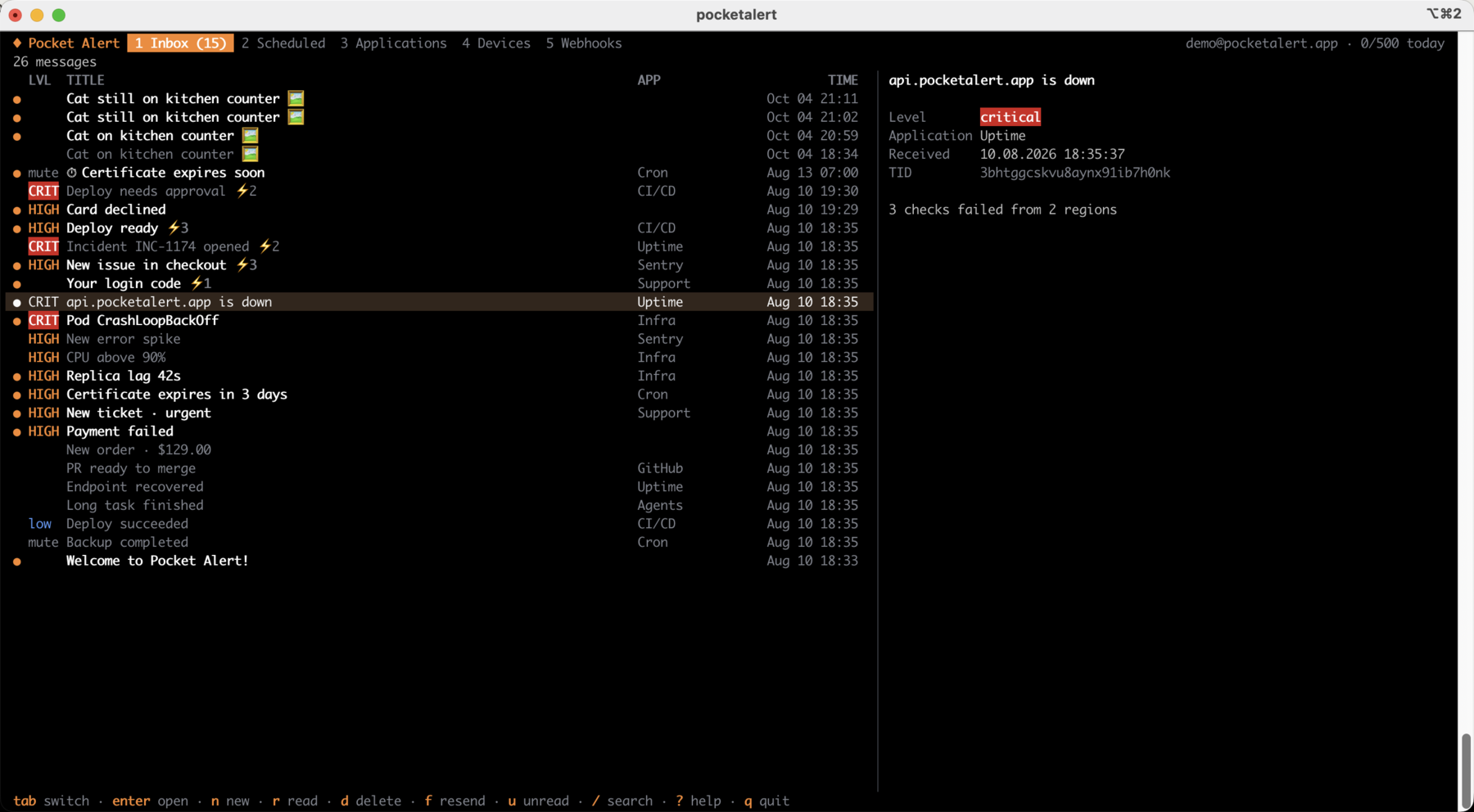
pocketalert uipocketalert ui apre un'app a schermo intero. Puoi sfogliare e cercare nella inbox, leggere i messaggi (aprirne uno lo segna come letto) e comporne di nuovi scegliendo applicazione, dispositivo, livello, orario di invio, immagine e pulsanti di azione. Messaggi programmati, applicazioni, dispositivi e webhook — con le richieste recenti — sono a un tasto di distanza. I nuovi messaggi compaiono automaticamente.
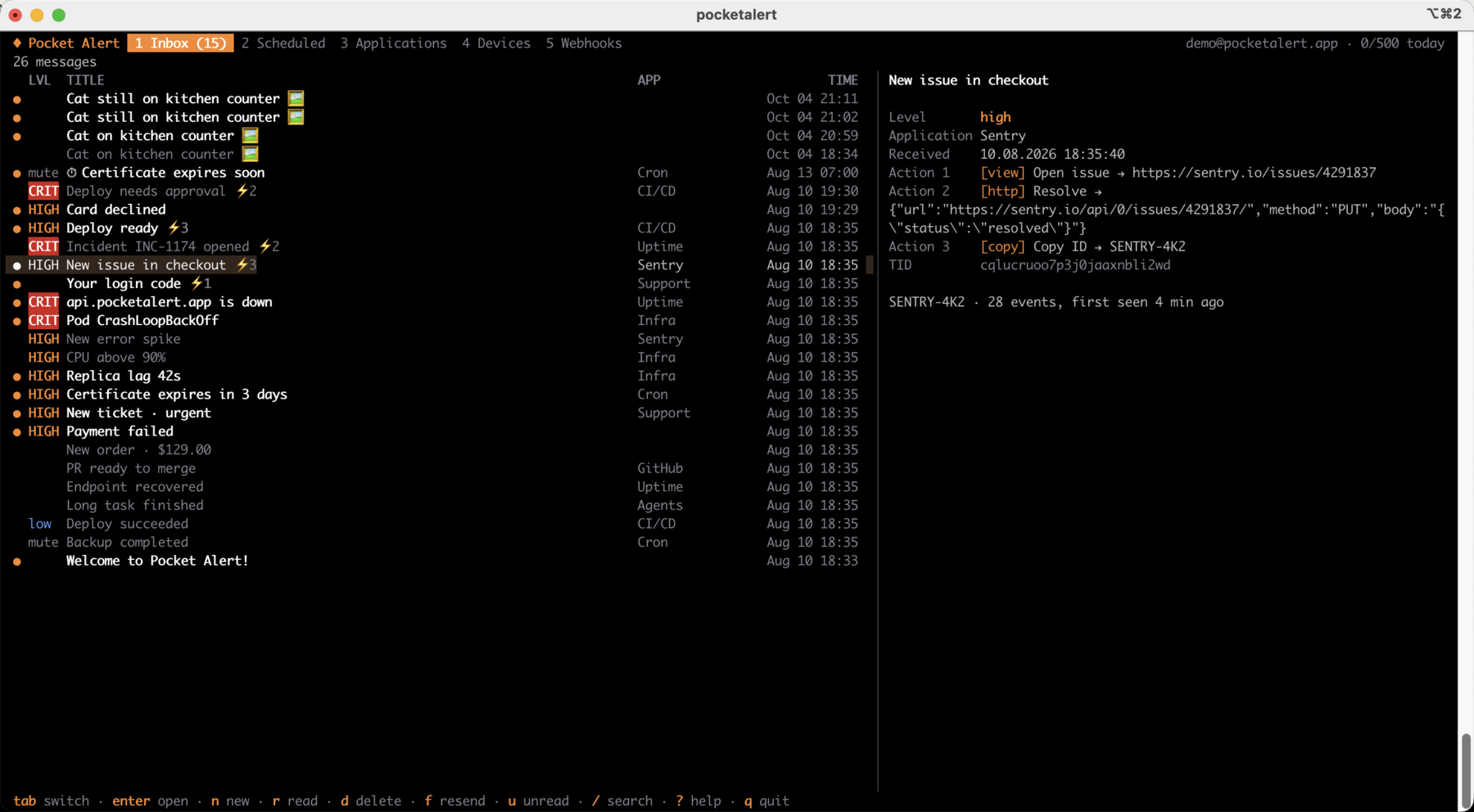
Il pannello di anteprima mostra l'intero messaggio, inclusi i pulsanti di azione e la destinazione di ciascuno:
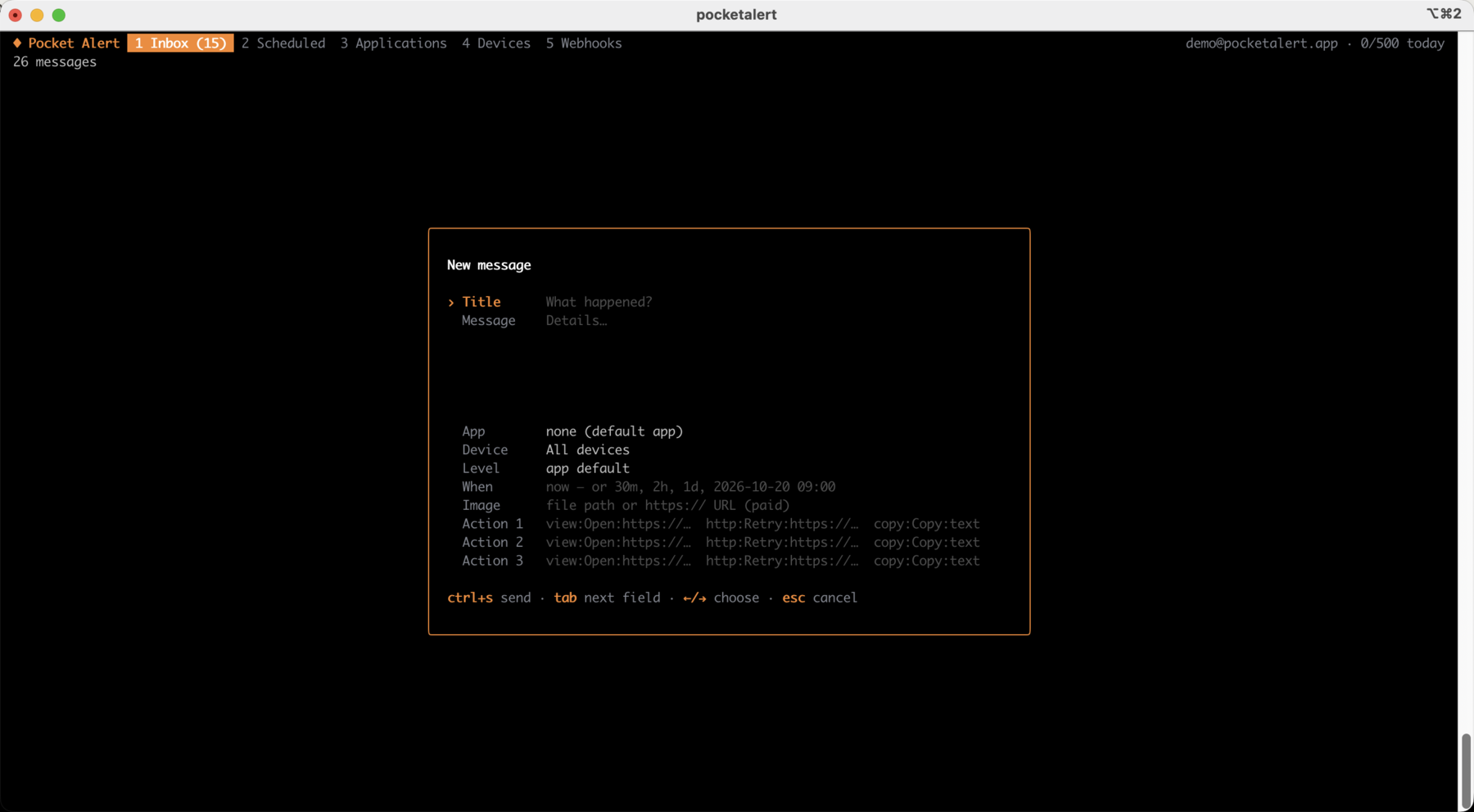
n apre il compositore. I pulsanti di azione usano lo stesso formato type:label:value di --action:
| Tasto | Azione |
|---|---|
tab, 1…5 | Inbox, Programmati, Applicazioni, Dispositivi, Webhook |
enter / esc | Apri / indietro. Su un'applicazione o un dispositivo: mostra i suoi messaggi |
n | Nuovo messaggio, ctrl+s invia |
f | Reinvia o duplica il messaggio selezionato |
r / a / u | Attiva/disattiva letto / segna tutti come letti / mostra solo i non letti |
d | Elimina un messaggio, annulla uno programmato, rimuovi una risorsa (chiede conferma) |
s | Invia all'applicazione o al dispositivo selezionato |
e / v / t | Rinomina / livello predefinito dell'app / sospendi o riprendi un webhook |
/ | Cerca |
y | Copia il testo del messaggio, il TID o l'URL del webhook |
? | Tutte le scorciatoie |
Notifica al termine di un comando
exec esegue un comando, mostra l'output come al solito, poi invia una push con lo stato di uscita, la durata e le ultime righe di output. Il codice di uscita del comando viene restituito invariato.
pocketalert exec -- make release
pocketalert exec --on failure -l critical -- ./backup.sh
pocketalert exec -t "Nightly import" --tail 20 -- python import.py| Flag | Descrizione |
|---|---|
--on <when> | always (predefinito), success, failure |
--tail <n> | Righe di output da includere (predefinito 10, 0 per ometterle) |
-t, --title <name> | Nome nel titolo al posto del comando |
Le esecuzioni fallite usano di default il livello high. I flag di invio di send (-a, -d, -l, --action, --image, -q) funzionano anche qui. La conferma va su stderr, così lo stdout del comando resta pulito per le pipe.
Osservare un log
watch trasforma le righe ricevute via pipe in notifiche. Le righe che arrivano entro --batch (predefinito 5s) vengono raggruppate in un'unica push, fino a --max-lines (predefinito 20), così una raffica di errori consuma un solo messaggio dalla quota giornaliera. I flag di invio di send funzionano anche qui.
tail -f app.log | grep --line-buffered ERROR | pocketalert watch -t "app errors"
journalctl -fu nginx | pocketalert watch --batch 1m -l high
Messaggi
pocketalert messages list                 # 20 newest
pocketalert messages list -n 50 --offset 50
pocketalert messages list --sort asc --device <device-tid>
pocketalert messages get <tid>            # also marks it as read
pocketalert messages read <tid> [<tid>…]
pocketalert messages read --all
pocketalert messages delete <tid> [<tid>…]
pocketalert messages delete --all         # asks for confirmation; --yes in scripts
pocketalert messages stats                # messages per day
pocketalert usage                         # today's usage against the daily limit
Applicazioni
pocketalert apps list
pocketalert apps get <tid>
pocketalert apps create -n "Production" -c "#EF4444" -l high
pocketalert apps update <tid> --name "Prod" --level critical
pocketalert apps delete <tid>
--level imposta il livello predefinito per i messaggi che non ne specificano uno.
Dispositivi
pocketalert devices list
pocketalert devices get <tid>
pocketalert devices rename <tid> "Work iPhone"
pocketalert devices delete <tid>
Webhook
pocketalert webhooks list
pocketalert webhooks get <tid>
pocketalert webhooks history <tid> [--status error] [--page 2]
pocketalert webhooks delete <tid>pocketalert webhooks create -n "GitHub" -m "*"pocketalert webhooks create -n "Deploy" -m "Deployed %repository.name% by %sender.login%"pocketalert webhooks create -n "Alertmanager" -m "%alerts.0.annotations.summary%" -l critical \
--action "view:Open:%externalURL%"pocketalert webhooks create -n "Uptime" -m "%monitor.name% is %status%" --slug uptime-alertsL'output mostra l'URL in ingresso (https://p4a.me/wh/…) e un comando curl per testarlo. webhooks update <tid> modifica solo i flag che passi; usa --active=false per sospendere un webhook.
Form
pocketalert forms list
pocketalert forms delete <tid>
I form si creano nella console web.
Chiavi API
pocketalert apikeys list
pocketalert apikeys create -n "CI"
pocketalert apikeys delete <tid>
WARNING
Il token viene stampato una sola volta alla creazione: salvalo subito.
Scripting
Ogni comando accetta --json e stampa la risposta grezza dell'API:
pocketalert messages list --json | jq -r '.data[].title'
TID=$(pocketalert send "Build" "started" -q)
Gli errori vanno su stderr e terminano con un codice di uscita diverso da zero. Una risposta 429 spiega il limite giornaliero e quando si azzera.
Configurazione
pocketalert config                                    # show settings and where the key comes from
pocketalert config set base_url https://api.example.com
pocketalert config reset base_url
~/.pocketalert/config.json (permessi 600, directory 700):
{
  "api_key": "your-api-key",
  "base_url": "https://api.pocketalert.app"
}
Aggiornamento dalla 1.x
Installa la 2.x con uno dei metodi sopra; legge lo stesso ~/.pocketalert/config.json, quindi la chiave salvata continua a funzionare. Gli script potrebbero richiedere tre modifiche:
- Il messaggio è obbligatorio.
pocketalert send -t "Cron OK"senza-mora dà errore. Aggiungi un messaggio, passalo via pipe, oppure usaexec. - Non mescolare le forme. Usa
send "Title" "Message"oppuresend -t "Title" -m "Message".send -t "Title" "Message"fallisce contitle given both as argument and --title. - Usa
-mper il testo generato. Un messaggio posizionale che inizia con-(una lista Markdown prodotta da un agente AI, per esempio) viene interpretato come flag;-m "$text"è sempre sicuro.
Gli archivi di release ora sono pocketalert_<os>_<arch>.tar.gz (.zip su Windows) invece dei vecchi file cdn.pocketalert.app/cli/*.zip.
Completamento della shell
pocketalert completion zsh > "${fpath[1]}/_pocketalert"pocketalert completion bash > /etc/bash_completion.d/pocketalertpocketalert completion fish > ~/.config/fish/completions/pocketalert.fishHomebrew installa il completamento automaticamente.
Esempi
GitHub Actions
- name: Deploy
  run: pocketalert exec -t "Deploy ${{ github.ref_name }}" -- make deploy
  env:
    POCKETALERT_API_KEY: ${{ secrets.POCKETALERT_API_KEY }}
Preferisci uno step già pronto? Vedi la GitHub Action.
Cron
# Alert only when the backup fails
0 3 * * * /usr/local/bin/pocketalert exec --on failure -l critical -- /opt/backup.sh
Controllo di un servizio
#!/bin/sh
systemctl is-active --quiet nginx || \
  pocketalert send "NGINX down" "on $(hostname)" -l critical \
    --action "view:Status page:https://status.example.com"