
命令行界面(CLI)
在终端、脚本和 CI 中发送推送通知,并管理 Pocket Alert 的应用、设备、Webhook 和 API 密钥。源代码和发布版本:github.com/PocketAlert/cli。
安装
curl -fsSL https://raw.githubusercontent.com/PocketAlert/cli/main/install.sh | shbrew install pocketalert/tap/pocketalertgo install github.com/PocketAlert/cli/cmd/pocketalert@latest脚本会校验 SHA-256 校验和,并安装到 /usr/local/bin(或 ~/.local/bin)。如需固定版本,设置 POCKETALERT_VERSION=v2.1.0。
手动下载
以下链接始终指向最新版本:
| 平台 | 架构 | 下载 |
|---|---|---|
| Linux | AMD64 | pocketalert_linux_amd64.tar.gz |
| Linux | ARM64 | pocketalert_linux_arm64.tar.gz |
| macOS | Intel | pocketalert_darwin_amd64.tar.gz |
| macOS | Apple Silicon | pocketalert_darwin_arm64.tar.gz |
| Windows | AMD64 | pocketalert_windows_amd64.zip |
tar -xzf pocketalert_*.tar.gz
sudo mv pocketalert /usr/local/bin/
# macOS, if Gatekeeper blocks a browser download:
xattr -d com.apple.quarantine /usr/local/bin/pocketalert# Unzip, then add the folder with pocketalert.exe to PATH
.\pocketalert.exe --help身份验证
在 设置 → API 密钥 中创建 API 密钥,然后执行:
pocketalert auth在隐藏的提示符处粘贴密钥,它不会进入你的 shell 历史记录。CLI 会先校验密钥,再将其保存到 ~/.pocketalert/config.json。你也可以通过管道传入:echo "$KEY" | pocketalert auth。
在 CI 和容器中,跳过 auth,改为设置环境变量:
| 变量 | 用途 |
|---|---|
POCKETALERT_API_KEY | API 密钥;优先于已保存的密钥 |
POCKETALERT_API_URL | API 基础 URL(默认 https://api.pocketalert.app) |
POCKETALERT_CONFIG | 配置文件路径 |
pocketalert profile   # who am I?
pocketalert logout    # remove the saved key
发送通知
pocketalert send "Deploy finished" "v1.4.2 is live"标题和消息可以作为参数传入,也可以使用参数(-t、-m)。通过管道输入文本,或传入 -m -,即可从标准输入读取消息:
df -h | pocketalert send "Disk report"| 参数 | 说明 |
|---|---|
-a, --app <tid> | 应用 |
-d, --device <tid> | 设备,或 all(默认:所有设备) |
-l, --level <level> | silent、low、default、high、critical(或 -2…2) |
--action <type:label:value> | 操作按钮,最多可重复 3 次 |
--image <path|url> | 图片附件 |
--at <time> | 在 2026-10-20 09:00(账户时区)、RFC 3339 或 Unix 秒数时发送 |
--in <delay> | 在 30m、2h、1d、1d12h 之后发送 |
-q, --quiet | 仅输出消息 TID |
优先级
pocketalert send "Disk 95%" "/var is almost full" --level high
pocketalert send "Prod is down" "502 from api" --level critical
critical 会绕过勿扰模式。付费 在免费套餐中,它会以 high 发送,CLI 会输出提示。参见 优先级。
操作按钮 付费
pocketalert send "Deploy failed" "main@4f2c" -l critical \
  --action "view:Open logs:https://ci.example.com/run/1" \
  --action "http:Retry:https://ci.example.com/run/1/retry" \
--action "copy:Copy SHA:4f2c9e1"| 类型 | 值 |
|---|---|
view | 要打开的 URL |
http | URL(发送 POST)、GET https://…,或 JSON 对象 {"url":"…","method":"PUT","headers":{…},"body":"…"} |
copy | 要复制的文本 |
参见 操作按钮。
定时发送 付费
pocketalert send "Standup" "In 10 minutes" --at "2026-10-20 09:50"
pocketalert send "Reminder" "Rotate the keys" --in 1d

pocketalert scheduled list                  # pending, soonest first
pocketalert scheduled list --status all
pocketalert scheduled cancel <tid>
消息最多可提前 30 天定时发送。参见 定时发送。
图片 付费
pocketalert send "Grafana" "CPU spike" --image ./panel.png
pocketalert send "Grafana" "CPU spike" --image https://example.com/panel.png
交互模式
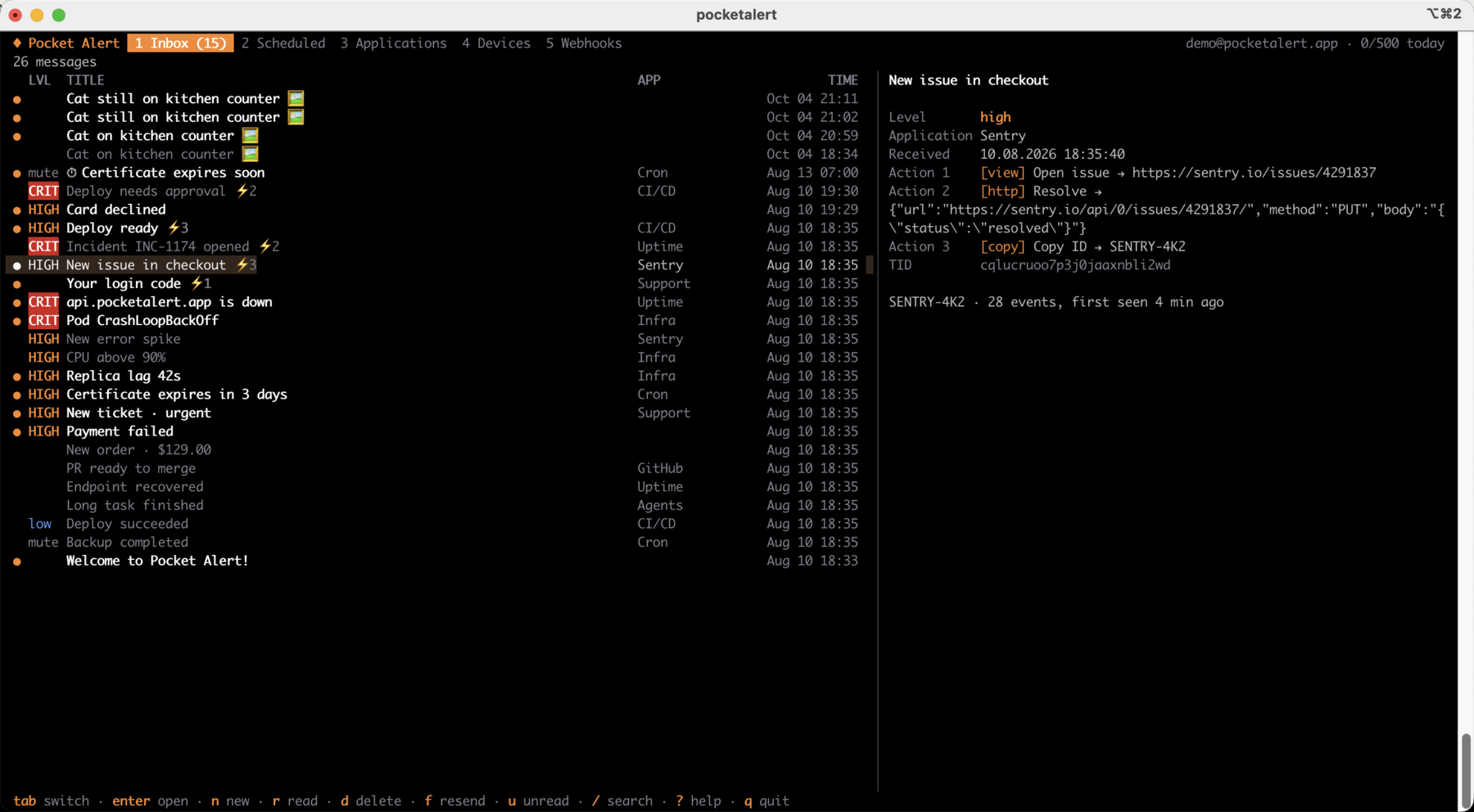
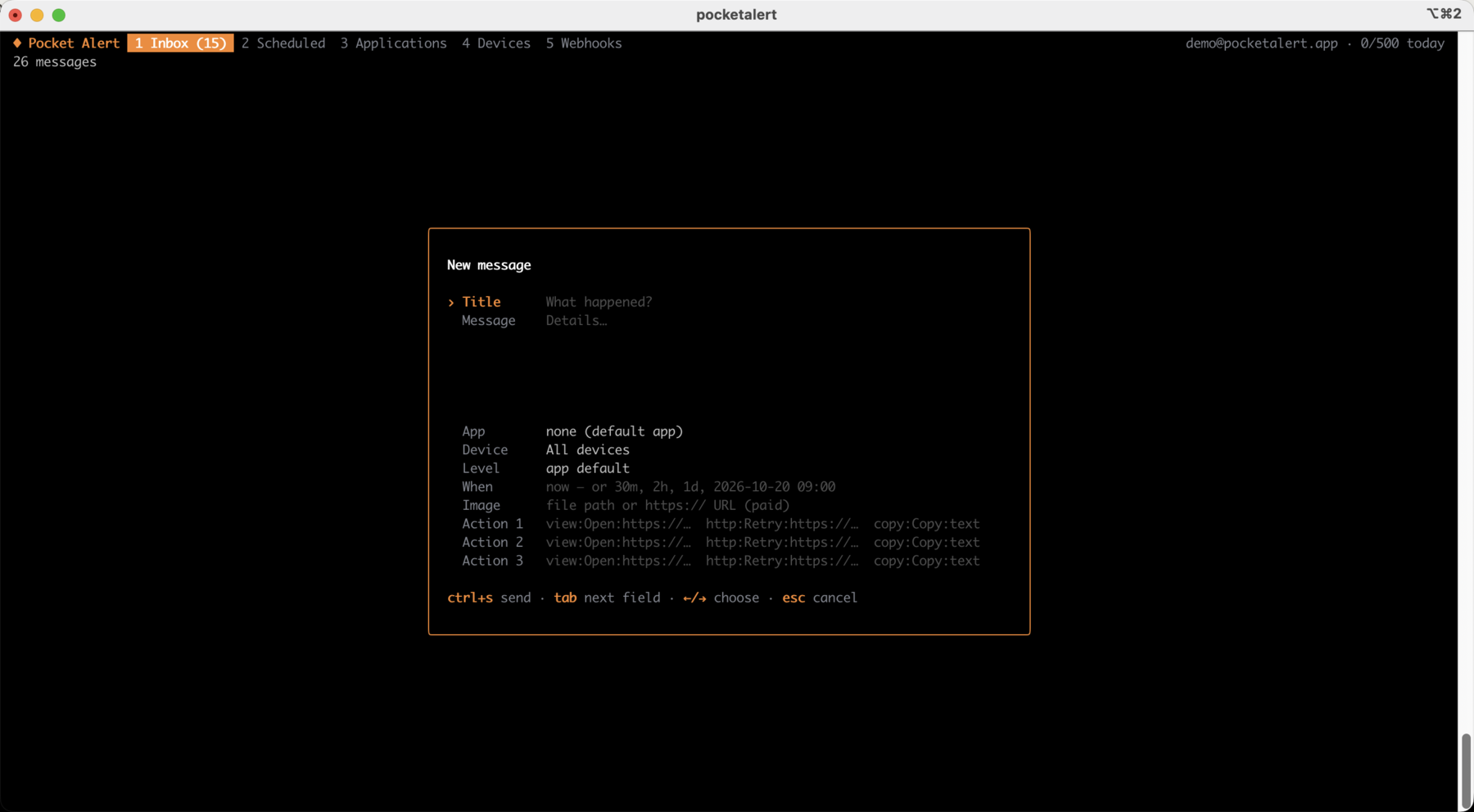
pocketalert uipocketalert ui 会打开全屏应用。你可以浏览和搜索收件箱、阅读消息(打开消息即会标记为已读),并通过选择应用、设备、优先级、发送时间、图片和操作按钮来撰写新消息。定时消息、应用、设备和 Webhook(包括其近期请求)只需按一个键即可查看。新消息会自动显示。
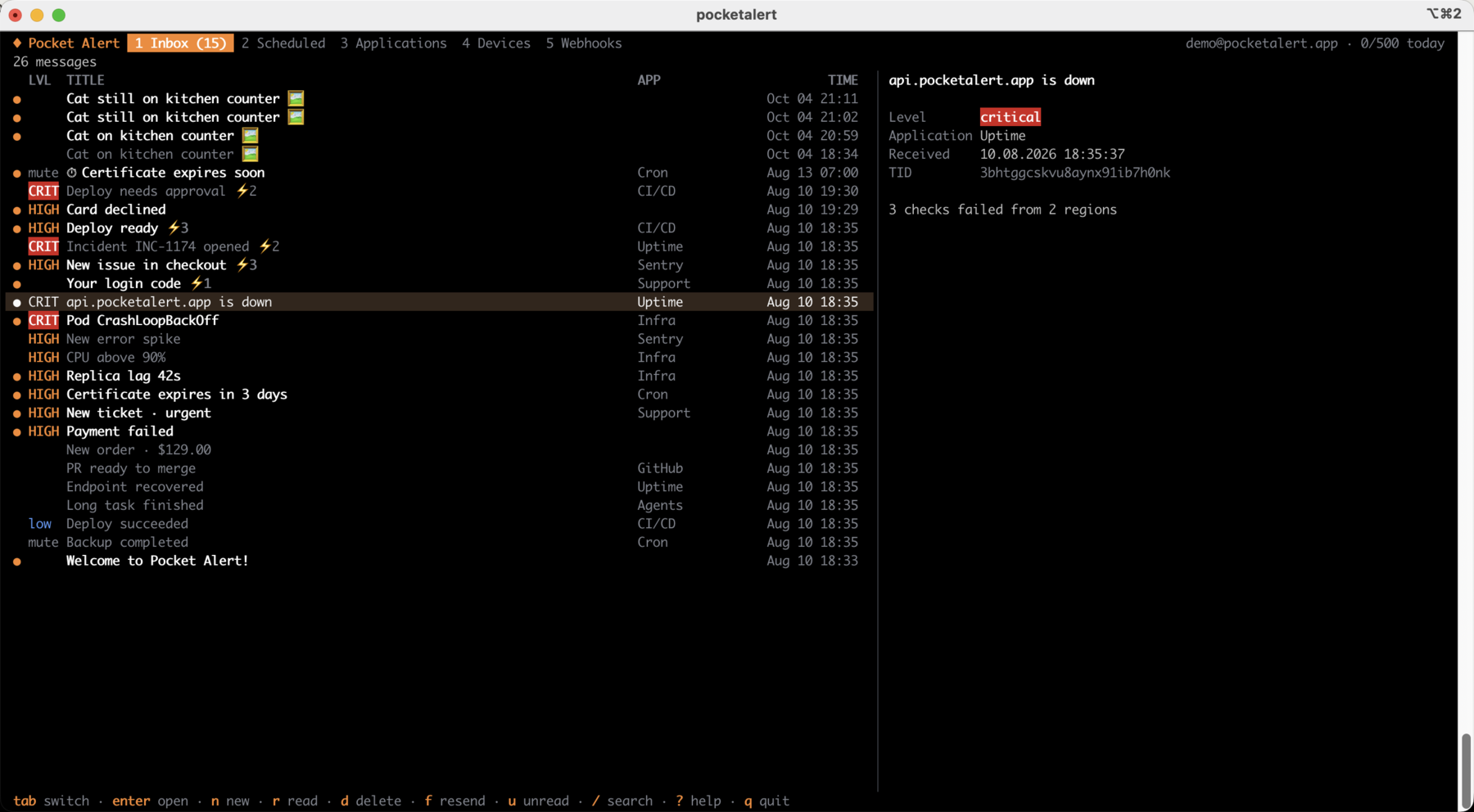
预览窗格会显示完整消息,包括其操作按钮及每个按钮的指向:
按 n 打开编辑器。操作按钮使用与 type:label:value 相同的 --action 格式:
| 按键 | 操作 |
|---|---|
tab、1…5 | 收件箱、定时、应用、设备、Webhook |
enter / esc | 打开 / 返回。在应用或设备上:显示其消息 |
n | 新建消息,ctrl+s 发送 |
f | 重新发送或复制所选消息 |
r / a / u | 切换已读 / 全部标为已读 / 仅显示未读 |
d | 删除消息、取消定时消息或移除资源(会先询问) |
s | 发送到所选应用或设备 |
e / v / t | 重命名 / 应用默认优先级 / 暂停或恢复 Webhook |
/ | 搜索 |
y | 复制消息文本、TID 或 Webhook URL |
? | 所有快捷键 |
命令结束时通知
exec 会运行一条命令,照常输出其内容,然后发送一条推送,包含退出状态、耗时和输出的最后几行。命令的退出码会被原样传递。
pocketalert exec -- make release
pocketalert exec --on failure -l critical -- ./backup.sh
pocketalert exec -t "Nightly import" --tail 20 -- python import.py| 参数 | 说明 |
|---|---|
--on <when> | always(默认)、success、failure |
--tail <n> | 包含的输出行数(默认 10,0 表示省略) |
-t, --title <name> | 标题中使用的名称,替代命令本身 |
运行失败时,默认优先级为 high。send 的发送参数(-a、-d、-l、--action、--image、-q)在这里同样可用。确认信息输出到 stderr,因此命令的 stdout 对管道保持干净。
监控日志
watch 会将管道输入的行转换为通知。在 --batch(默认 5s)时间内到达的行会被合并为一条推送,最多 --max-lines(默认 20)行,因此一连串错误只会消耗每日上限中的一条消息。send 的发送参数在这里同样可用。
tail -f app.log | grep --line-buffered ERROR | pocketalert watch -t "app errors"
journalctl -fu nginx | pocketalert watch --batch 1m -l high
消息
pocketalert messages list                 # 20 newest
pocketalert messages list -n 50 --offset 50
pocketalert messages list --sort asc --device <device-tid>
pocketalert messages get <tid>            # also marks it as read
pocketalert messages read <tid> [<tid>…]
pocketalert messages read --all
pocketalert messages delete <tid> [<tid>…]
pocketalert messages delete --all         # asks for confirmation; --yes in scripts
pocketalert messages stats                # messages per day
pocketalert usage                         # today's usage against the daily limit
应用
pocketalert apps list
pocketalert apps get <tid>
pocketalert apps create -n "Production" -c "#EF4444" -l high
pocketalert apps update <tid> --name "Prod" --level critical
pocketalert apps delete <tid>
--level 用于设置未指定优先级的消息的默认优先级。
设备
pocketalert devices list
pocketalert devices get <tid>
pocketalert devices rename <tid> "Work iPhone"
pocketalert devices delete <tid>
Webhook
pocketalert webhooks list
pocketalert webhooks get <tid>
pocketalert webhooks history <tid> [--status error] [--page 2]
pocketalert webhooks delete <tid>pocketalert webhooks create -n "GitHub" -m "*"pocketalert webhooks create -n "Deploy" -m "Deployed %repository.name% by %sender.login%"pocketalert webhooks create -n "Alertmanager" -m "%alerts.0.annotations.summary%" -l critical \
--action "view:Open:%externalURL%"pocketalert webhooks create -n "Uptime" -m "%monitor.name% is %status%" --slug uptime-alerts输出会显示入站 URL(https://p4a.me/wh/…)以及用于测试的 curl 命令。webhooks update <tid> 只会修改你传入的参数;使用 --active=false 可暂停 Webhook。
表单
pocketalert forms list
pocketalert forms delete <tid>
表单需要在 网页控制台 中创建。
API 密钥
pocketalert apikeys list
pocketalert apikeys create -n "CI"
pocketalert apikeys delete <tid>
WARNING
令牌仅在创建时显示一次,请立即保存。
脚本化使用
每个命令都支持 --json,并输出原始 API 响应:
pocketalert messages list --json | jq -r '.data[].title'
TID=$(pocketalert send "Build" "started" -q)
错误会输出到 stderr,并以非零退出码结束。429 响应会说明每日上限以及重置时间。
配置
pocketalert config                                    # show settings and where the key comes from
pocketalert config set base_url https://api.example.com
pocketalert config reset base_url~/.pocketalert/config.json(权限 600,目录 700):
{
  "api_key": "your-api-key",
  "base_url": "https://api.pocketalert.app"
}
从 1.x 升级
使用上述任一方式安装 2.x;它会读取相同的 ~/.pocketalert/config.json,因此已保存的密钥仍可继续使用。脚本可能需要做三处修改:
- 必须提供消息。 现在
pocketalert send -t "Cron OK"如果没有-m会报错。请添加消息、通过管道传入,或使用exec。 - 不要混用两种写法。 使用
send "Title" "Message"或send -t "Title" -m "Message"。send -t "Title" "Message"会失败,并提示title given both as argument and --title。 - 生成的文本请使用
-m。 以-开头的位置消息(例如来自 AI 代理的 Markdown 列表)会被解析为参数;-m "$text"始终安全。
发布压缩包现在命名为 pocketalert_<os>_<arch>.tar.gz(Windows 上为 .zip),取代了旧的 cdn.pocketalert.app/cli/*.zip 文件。
Shell 自动补全
pocketalert completion zsh > "${fpath[1]}/_pocketalert"pocketalert completion bash > /etc/bash_completion.d/pocketalertpocketalert completion fish > ~/.config/fish/completions/pocketalert.fishHomebrew 会自动安装补全脚本。
示例
GitHub Actions
- name: Deploy
  run: pocketalert exec -t "Deploy ${{ github.ref_name }}" -- make deploy
  env:
    POCKETALERT_API_KEY: ${{ secrets.POCKETALERT_API_KEY }}
更喜欢现成的步骤?参见 GitHub Action。
Cron
# Alert only when the backup fails
0 3 * * * /usr/local/bin/pocketalert exec --on failure -l critical -- /opt/backup.sh
服务检查
#!/bin/sh
systemctl is-active --quiet nginx || \
  pocketalert send "NGINX down" "on $(hostname)" -l critical \
    --action "view:Status page:https://status.example.com"