
명령줄 인터페이스(CLI)
터미널, 스크립트, CI에서 푸시 알림을 보내고 Pocket Alert 애플리케이션, 기기, 웹훅, API 키를 관리해요. 소스 코드와 릴리스는 github.com/PocketAlert/cli에서 확인할 수 있어요.
설치
curl -fsSL https://raw.githubusercontent.com/PocketAlert/cli/main/install.sh | shbrew install pocketalert/tap/pocketalertgo install github.com/PocketAlert/cli/cmd/pocketalert@latest스크립트는 SHA-256 체크섬을 검증하고 /usr/local/bin(또는 ~/.local/bin)에 설치해요. 특정 버전을 고정하려면 POCKETALERT_VERSION=v2.1.0을 설정하세요.
수동 다운로드
아래 링크는 항상 최신 릴리스를 가리켜요.
| 플랫폼 | 아키텍처 | 다운로드 |
|---|---|---|
| Linux | AMD64 | pocketalert_linux_amd64.tar.gz |
| Linux | ARM64 | pocketalert_linux_arm64.tar.gz |
| macOS | Intel | pocketalert_darwin_amd64.tar.gz |
| macOS | Apple 실리콘 | pocketalert_darwin_arm64.tar.gz |
| Windows | AMD64 | pocketalert_windows_amd64.zip |
tar -xzf pocketalert_*.tar.gz
sudo mv pocketalert /usr/local/bin/
# macOS, if Gatekeeper blocks a browser download:
xattr -d com.apple.quarantine /usr/local/bin/pocketalert# Unzip, then add the folder with pocketalert.exe to PATH
.\pocketalert.exe --help인증
설정 → API 키에서 API 키를 만든 다음 아래 명령을 실행하세요.
pocketalert auth숨겨진 입력 프롬프트에 키를 붙여 넣으세요. 키는 셸 기록에 남지 않아요. CLI는 키를 ~/.pocketalert/config.json에 저장하기 전에 유효성을 확인해요. 파이프로 전달할 수도 있어요: echo "$KEY" | pocketalert auth.
CI나 컨테이너 환경에서는 auth 대신 환경 변수를 설정하세요.
| 변수 | 용도 |
|---|---|
POCKETALERT_API_KEY | API 키. 저장된 키보다 우선해요 |
POCKETALERT_API_URL | API 기본 URL (기본값 https://api.pocketalert.app) |
POCKETALERT_CONFIG | 설정 파일 경로 |
pocketalert profile   # who am I?
pocketalert logout    # remove the saved key
푸시 알림 보내기
pocketalert send "Deploy finished" "v1.4.2 is live"제목과 메시지는 인수 또는 플래그(-t, -m)로 전달할 수 있어요. 텍스트를 파이프로 넘기거나 -m -를 사용하면 표준 입력에서 메시지를 읽어요.
df -h | pocketalert send "Disk report"| 플래그 | 설명 |
|---|---|
-a, --app <tid> | 애플리케이션 |
-d, --device <tid> | 기기, 또는 all (기본값: 모든 기기) |
-l, --level <level> | silent, low, default, high, critical (또는 -2…2) |
--action <type:label:value> | 액션 버튼. 최대 3번까지 반복 가능 |
--image <path|url> | 이미지 첨부 |
--at <time> | 2026-10-20 09:00(계정 시간대 기준), RFC 3339 또는 Unix 초 단위로 발송 |
--in <delay> | 30m, 2h, 1d, 1d12h 이후에 발송 |
-q, --quiet | 메시지 TID만 출력 |
중요도
pocketalert send "Disk 95%" "/var is almost full" --level high
pocketalert send "Prod is down" "502 from api" --level criticalcritical은 방해 금지 모드를 우회해요. 유료 무료 플랜에서는 high로 발송되며, CLI가 이를 알려주는 메시지를 출력해요. 자세한 내용은 중요도 설정을 참고하세요.
액션 버튼 유료
pocketalert send "Deploy failed" "main@4f2c" -l critical \
  --action "view:Open logs:https://ci.example.com/run/1" \
  --action "http:Retry:https://ci.example.com/run/1/retry" \
--action "copy:Copy SHA:4f2c9e1"| 유형 | 값 |
|---|---|
view | 열 URL |
http | URL(POST 전송), GET https://…, 또는 JSON 객체 {"url":"…","method":"PUT","headers":{…},"body":"…"} |
copy | 복사할 텍스트 |
자세한 내용은 액션 버튼을 참고하세요.
예약 발송 유료
pocketalert send "Standup" "In 10 minutes" --at "2026-10-20 09:50"
pocketalert send "Reminder" "Rotate the keys" --in 1d

pocketalert scheduled list                  # pending, soonest first
pocketalert scheduled list --status all
pocketalert scheduled cancel <tid>
메시지는 최대 30일 앞까지 예약할 수 있어요. 자세한 내용은 예약 발송을 참고하세요.
이미지 유료
pocketalert send "Grafana" "CPU spike" --image ./panel.png
pocketalert send "Grafana" "CPU spike" --image https://example.com/panel.png
대화형 모드
pocketalert uipocketalert ui는 전체 화면 앱을 열어요. 받은 편지함을 탐색하고 검색하며, 메시지를 읽을 수 있어요(메시지를 열면 읽음으로 표시돼요). 애플리케이션, 기기, 액션 버튼, 발송 시간, 이미지를 골라 새 메시지를 작성할 수도 있어요. 예약 메시지, 애플리케이션, 기기, 웹훅과 그 최근 요청 내역도 키 한 번이면 볼 수 있어요. 새 메시지는 자동으로 나타나요.
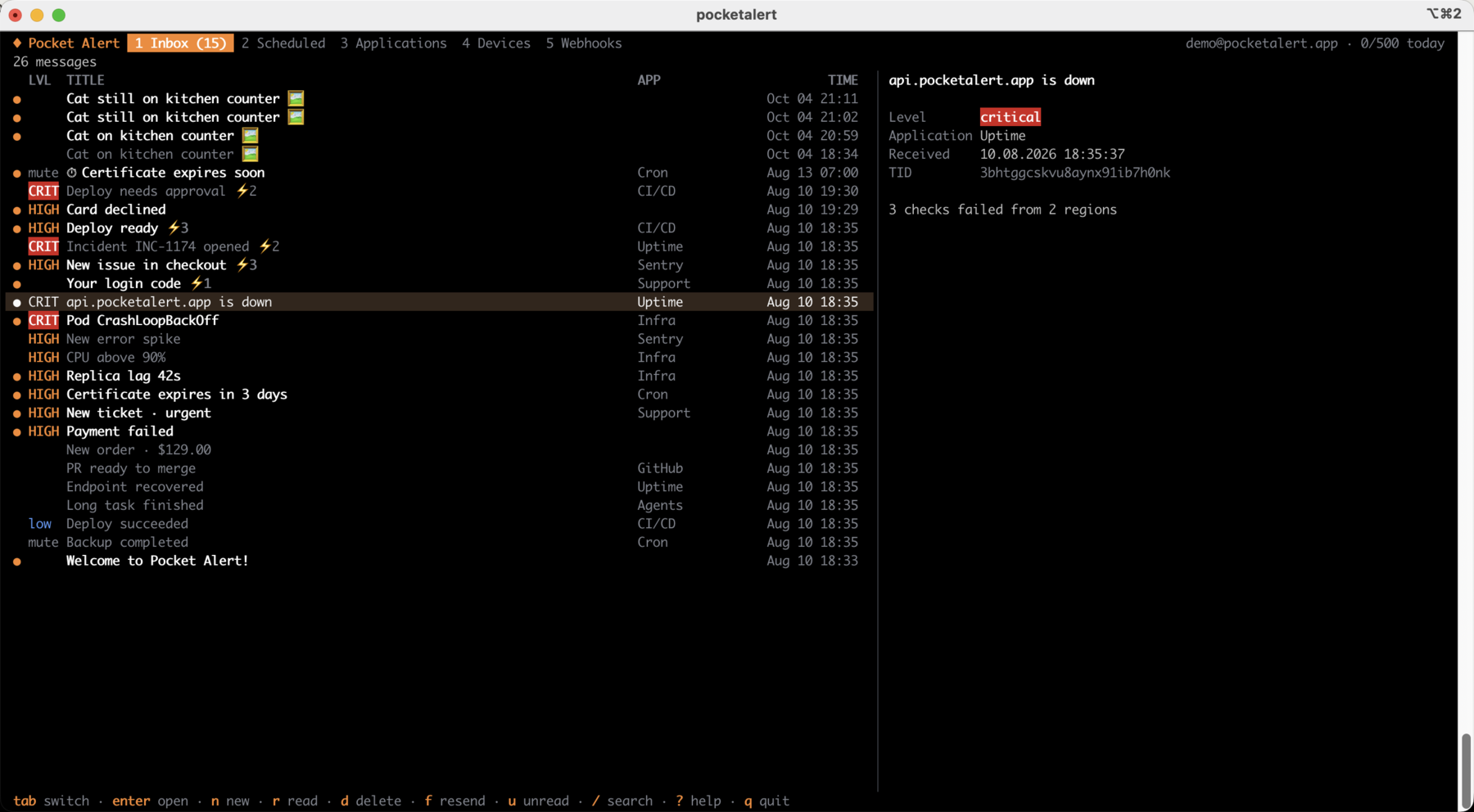
미리보기 창에서는 액션 버튼과 각 버튼이 가리키는 대상을 포함한 메시지 전체를 볼 수 있어요.
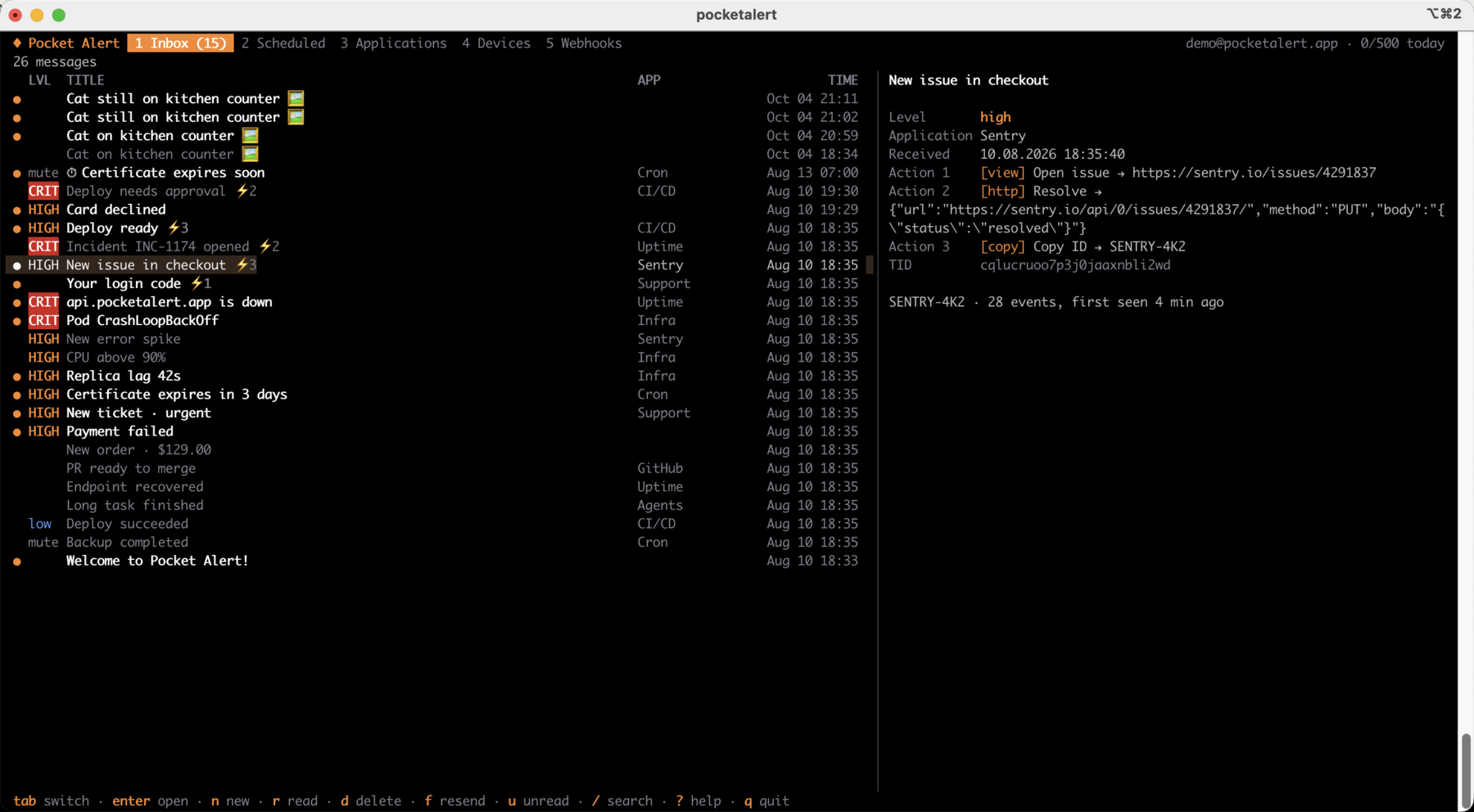
n을 누르면 작성 창이 열려요. 액션 버튼은 type:label:value과 같은 --action 형식을 사용해요.
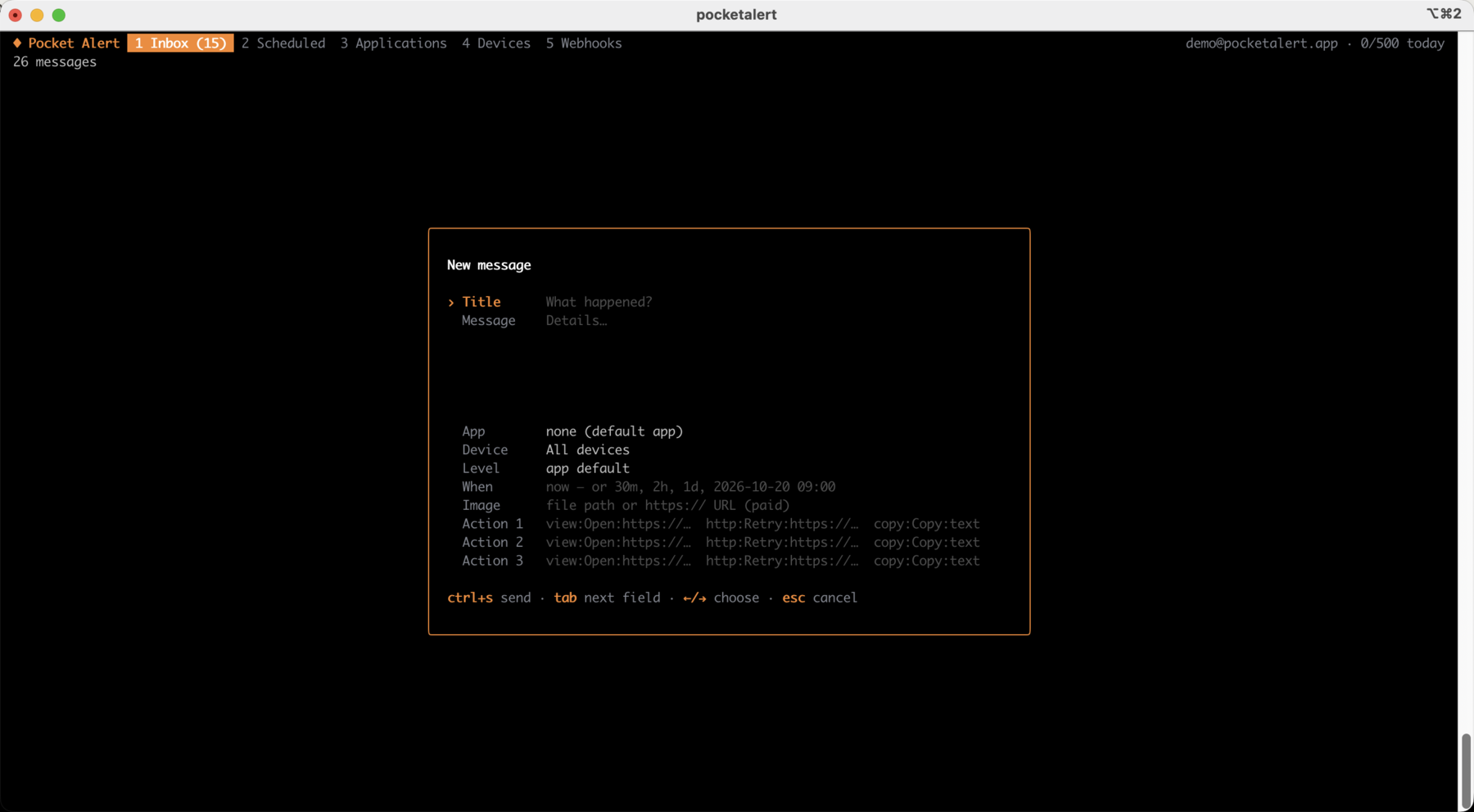
| 키 | 동작 |
|---|---|
tab, 1…5 | 받은 편지함, 예약, 애플리케이션, 기기, 웹훅 |
enter / esc | 열기 / 뒤로. 애플리케이션이나 기기에서는 해당 메시지 목록을 보여줘요 |
n | 새 메시지. ctrl+s로 발송 |
f | 선택한 메시지 재발송 또는 복제 |
r / a / u | 읽음 전환 / 모두 읽음 / 읽지 않은 메시지만 보기 |
d | 메시지 삭제, 예약 취소, 리소스 제거 (먼저 확인을 요청해요) |
s | 선택한 애플리케이션 또는 기기로 발송 |
e / v / t | 이름 변경 / 애플리케이션 기본 중요도 / 웹훅 일시 중지 또는 재개 |
/ | 검색 |
y | 메시지 텍스트, TID 또는 웹훅 URL 복사 |
? | 전체 단축키 보기 |
명령이 끝나면 알림 받기
exec은 명령을 실행하고 출력을 평소처럼 보여준 다음, 종료 상태, 실행 시간, 출력의 마지막 몇 줄을 담은 푸시 알림을 보내요. 명령의 종료 코드는 그대로 전달돼요.
pocketalert exec -- make release
pocketalert exec --on failure -l critical -- ./backup.sh
pocketalert exec -t "Nightly import" --tail 20 -- python import.py| 플래그 | 설명 |
|---|---|
--on <when> | always(기본값), success, failure |
--tail <n> | 포함할 출력 줄 수 (기본값 10, 생략하려면 0) |
-t, --title <name> | 명령 대신 제목에 들어갈 이름 |
실패한 실행은 기본적으로 high 중요도로 발송돼요. send의 발송 플래그(-a, -d, -l, --action, --image, -q)도 여기서 사용할 수 있어요. 확인 메시지는 stderr로 출력되므로, 명령의 stdout은 파이프용으로 깨끗하게 유지돼요.
로그 감시하기
watch는 파이프로 받은 줄을 알림으로 바꿔요. --batch(기본값 5s) 안에 도착한 줄은 --max-lines(기본값 20)까지 하나의 푸시로 묶여요. 그래서 오류가 한꺼번에 쏟아져도 일일 한도에서는 메시지 한 건만 차감돼요. send의 발송 플래그도 여기서 사용할 수 있어요.
tail -f app.log | grep --line-buffered ERROR | pocketalert watch -t "app errors"
journalctl -fu nginx | pocketalert watch --batch 1m -l high
메시지
pocketalert messages list                 # 20 newest
pocketalert messages list -n 50 --offset 50
pocketalert messages list --sort asc --device <device-tid>
pocketalert messages get <tid>            # also marks it as read
pocketalert messages read <tid> [<tid>…]
pocketalert messages read --all
pocketalert messages delete <tid> [<tid>…]
pocketalert messages delete --all         # asks for confirmation; --yes in scripts
pocketalert messages stats                # messages per day
pocketalert usage                         # today's usage against the daily limit
애플리케이션
pocketalert apps list
pocketalert apps get <tid>
pocketalert apps create -n "Production" -c "#EF4444" -l high
pocketalert apps update <tid> --name "Prod" --level critical
pocketalert apps delete <tid>--level은 중요도를 지정하지 않은 메시지에 적용되는 기본 중요도를 설정해요.
기기
pocketalert devices list
pocketalert devices get <tid>
pocketalert devices rename <tid> "Work iPhone"
pocketalert devices delete <tid>
웹훅
pocketalert webhooks list
pocketalert webhooks get <tid>
pocketalert webhooks history <tid> [--status error] [--page 2]
pocketalert webhooks delete <tid>pocketalert webhooks create -n "GitHub" -m "*"pocketalert webhooks create -n "Deploy" -m "Deployed %repository.name% by %sender.login%"pocketalert webhooks create -n "Alertmanager" -m "%alerts.0.annotations.summary%" -l critical \
--action "view:Open:%externalURL%"pocketalert webhooks create -n "Uptime" -m "%monitor.name% is %status%" --slug uptime-alerts출력에는 수신 URL(https://p4a.me/wh/…)과 이를 테스트할 수 있는 curl 명령이 표시돼요. webhooks update <tid>는 전달한 플래그만 변경해요. 웹훅을 일시 중지하려면 --active=false를 사용하세요.
폼
pocketalert forms list
pocketalert forms delete <tid>
폼은 웹 콘솔에서 만들어요.
API 키
pocketalert apikeys list
pocketalert apikeys create -n "CI"
pocketalert apikeys delete <tid>
WARNING
토큰은 생성 시 한 번만 표시돼요. 바로 안전한 곳에 저장하세요.
스크립팅
모든 명령은 --json 옵션을 지원하며, 가공하지 않은 API 응답을 출력해요.
pocketalert messages list --json | jq -r '.data[].title'
TID=$(pocketalert send "Build" "started" -q)
오류는 stderr로 출력되고, 0이 아닌 종료 코드로 끝나요. 429 응답은 일일 한도를 초과했다는 사실과 한도가 언제 초기화되는지 알려줘요.
설정
pocketalert config                                    # show settings and where the key comes from
pocketalert config set base_url https://api.example.com
pocketalert config reset base_url~/.pocketalert/config.json(권한 600, 디렉터리 700):
{
  "api_key": "your-api-key",
  "base_url": "https://api.pocketalert.app"
}
1.x에서 업그레이드하기
위의 방법 중 아무거나로 2.x를 설치하세요. 2.x는 같은 ~/.pocketalert/config.json을 읽으므로 저장된 키를 그대로 쓸 수 있어요. 다만 스크립트에는 다음 세 가지 변경이 필요할 수 있어요.
- 메시지가 필수예요. 이제
pocketalert send -t "Cron OK"없이-m을 실행하면 오류가 나요. 메시지를 추가하거나, 파이프로 전달하거나,exec을 사용하세요. - 두 형식을 섞지 마세요.
send "Title" "Message"또는send -t "Title" -m "Message"를 사용하세요.send -t "Title" "Message"는title given both as argument and --title오류와 함께 실패해요. - 생성된 텍스트에는
-m을 사용하세요.-로 시작하는 위치 인수 메시지(예: AI 에이전트가 만든 Markdown 목록)는 플래그로 해석돼요.-m "$text"를 쓰면 항상 안전해요.
릴리스 아카이브 이름은 이제 기존 pocketalert_<os>_<arch>.tar.gz 파일 대신 .zip(Windows에서는 cdn.pocketalert.app/cli/*.zip)예요.
셸 자동 완성
pocketalert completion zsh > "${fpath[1]}/_pocketalert"pocketalert completion bash > /etc/bash_completion.d/pocketalertpocketalert completion fish > ~/.config/fish/completions/pocketalert.fishHomebrew는 자동 완성을 자동으로 설치해요.
예제
GitHub Actions
- name: Deploy
  run: pocketalert exec -t "Deploy ${{ github.ref_name }}" -- make deploy
  env:
    POCKETALERT_API_KEY: ${{ secrets.POCKETALERT_API_KEY }}
이미 만들어진 단계를 쓰고 싶다면 GitHub Action을 확인하세요.
크론
# Alert only when the backup fails
0 3 * * * /usr/local/bin/pocketalert exec --on failure -l critical -- /opt/backup.sh
서비스 점검
#!/bin/sh
systemctl is-active --quiet nginx || \
  pocketalert send "NGINX down" "on $(hostname)" -l critical \
    --action "view:Status page:https://status.example.com"